
In the past decade, the growth in low-code and no-code solutions—promising that anyone can create simple computer programs using templates—has become a multi-billion dollar industry that touches everything from data and business analytics to application building and automation. As more companies look to integrate low-code and no-code solutions into their digital transformation plan, the question emerges again and again: what will happen to programming?
Programmers know their jobs won’t disappear with a broadscale low-code takeover (even low-code is built on code), but undeniably their roles as programmers will shift as more companies adopt low-code solutions. This report is for programmers and software development teams looking to navigate that shift and understand how low-code and no-code solutions will shape their approach to code and coding. It will be fundamental for anyone working in software development—and, indeed, anyone working in any business that is poised to become a digital business—to understand what low-code means, how it will transform their roles, what kinds of issues it creates, why it won’t work for everything, and what new kinds of programmers and programming will emerge as a result.

Learn faster. Dig deeper. See farther.
Everything Is Low-Code
Low-code: what does it even mean? “Low-code” sounds simple: less is more, right? But we’re not talking about modern architecture; we’re talking about telling a computer how to achieve some result. In that context, low-code quickly becomes a complex topic.
One way of looking at low-code starts with the spreadsheet, which has a pre-history that goes back to the 1960s—and, if we consider paper, even earlier. It’s a different, non-procedural, non-algorithmic approach to doing computation that has been wildly successful: is there anyone in finance who can’t use Excel? Excel has become table stakes. And spreadsheets have enabled a whole generation of businesspeople to use computers effectively—most of whom have never used any other programming language, and wouldn’t have wanted to learn a more “formal” programming language. So we could think about low-code as tools similar to Excel, tools that enable people to use computers effectively without learning a formal programming language.
Another way of looking at low-code is to take an even bigger step back, and look at the history of programming from the start. Python is low-code relative to C++; C and FORTRAN are low-code relative to assembler; assembler is low-code relative to machine language and toggling switches to insert binary instructions directly into the computer’s memory. In this sense, the history of programming is the history of low-code. It’s a history of democratization and reducing barriers to entry. (Although, in an ironic and unfortunate twist, many of the people who spent their careers plugging in patch cords, toggling in binary, and doing math on mechanical calculators were women, who were later forced out of the industry as those jobs became “professional.” Democratization is relative.) It may be surprising to say that Python is a low-code language, but it takes less work to accomplish something in Python than in C; rather than building everything from scratch, you’re relying on millions of lines of code in the Python runtime environment and its libraries.
In taking this bigger-picture, language-based approach to understanding low-code, we also have to take into account what the low-code language is being used for. Languages like Java and C++ are intended for large projects involving collaboration between teams of programmers. These are projects that can take years to develop, and run to millions of lines of code. A language like bash or Perl is designed for short programs that connect other utilities; bash and Perl scripts typically have a single author, and are frequently only a few lines long. (Perl is legendary for inscrutable one-liners.) Python is in the middle. It’s not great for large programs (though it has certainly been used for them); its sweet spot is programs that are a few hundred lines long. That position between big code and minimal code probably has a lot to do with its success. A successor to Python might require less code (and be a “lower code” language, if that’s meaningful); it would almost certainly have to do something better. For example, R (a domain-specific language for stats) may be a better language for doing heavy duty statistics, and we’ve been told many times that it’s easier to learn if you think like a statistician. But that’s where the trade-off becomes apparent. Although R has a web framework that allows you to build data-driven dashboards, you wouldn’t use R to build an e-commerce or an automated customer service agent; those are tasks for which Python is well suited.
Is it completely out of bounds to say that Python is a low-code language? Perhaps; but it certainly requires much less coding than the languages of the 1960s and ’70s. Like Excel, though not as successfully, Python has made it possible for people to work with computers who would never have learned C or C++. (The same claim could probably be made for BASIC, and certainly for Visual Basic.)
But this makes it possible for us to talk about an even more outlandish meaning of low-code. Configuration files for large computational systems, such as Kubernetes, can be extremely complex. But configuring a tool is almost always simpler than writing the tool yourself. Kelsey Hightower said that Kubernetes is the “sum of all the bash scripts and best practices that most system administrators would cobble together over time”; it’s just that many years of experience have taught us the limitations of endless scripting. Replacing a huge and tangled web of scripts with a few configuration files certainly sounds like low-code. (You could object that Kubernetes’ configuration language isn’t Turing complete, so it’s not a programming language. Be that way.) It enables operations staff who couldn’t write Kubernetes from scratch, regardless of the language, to create configurations that manage very complicated distributed systems in production. What’s the ratio—a few hundred lines of Kubernetes configuration, compared to a million lines of Go, the language Kubernetes was written in? Is that low-code? Configuration languages are rarely simple, but they’re always simpler than writing the program you’re configuring.
As examples go, Kubernetes isn’t all that unusual. It’s an example of a “domain-specific language” (DSL) constructed to solve a specific kind of problem. DSLs enable someone to get a task done without having to describe the whole process from scratch, in immense detail. If you look around, there’s no shortage of domain-specific languages. Ruby on Rails was originally described as a DSL. COBOL was a DSL before anyone really knew what a DSL was. And so are many mainstays of Unix history: awk, sed, and even the Unix shell (which is much simpler than using old IBM JCLs to run a program). They all make certain programming tasks simpler by relying on a lot of code that’s hidden in libraries, runtime environments, and even other programming languages. And they all sacrifice generality for ease of use in solving a specific kind of problem.
So, now that we’ve broadened the meaning of low-code to include just about everything, do we give up? For the purposes of this report, we’re probably best off looking at the narrowest and most likely implementation of low-code technology and limiting ourselves to the first, Excel-like meaning of “low-code”—but remembering that the history of programming is the history of enabling people to do more with less, enabling people to work with computers without requiring as much formal education, adding layer upon layer of abstraction so that humans don’t need to understand the 0s and the 1s. So Python is low-code. Kubernetes is low-code. And their successors will inevitably be even lower-code; a lower-code version of Kubernetes might well be built on top of the Kubernetes API. Mirantis has taken a step in that direction by building an Integrated Development Environment (IDE) for Kubernetes. Can we imagine a spreadsheet-like (or even graphical) interface to Kubernetes configuration? We certainly can, and we’re fine with putting Python to the side. We’re also fine with putting Kubernetes aside, as long as we remember that DSLs are an important part of the low-code picture: in Paul Ford’s words, tools to help users do whatever “makes the computer go.”
Excel (And Why It Works)
Excel deservedly comes up in any discussion of low-code programming. So it’s worth looking at what it does (and let’s willfully ignore Excel’s immediate ancestors, VisiCalc and Lotus). Why has Excel succeeded?
One important difference between spreadsheets and traditional programming languages is so obvious that it’s easily overlooked. Spreadsheets are “written” on a two-dimensional grid (Figure 1). Every other programming language in common use is a list of statements: a list of instructions that are executed more or less sequentially.
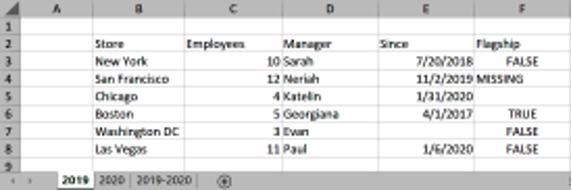
What’s a 2D grid useful for? Formatting, for one thing. It’s great for making tables. Many Excel files do that—and no more. There are no formulas, no equations, just text (including numbers) arranged into a grid and aligned properly. By itself, that is tremendously enabling.
Add the simplest of equations, and built-in understanding of numeric datatypes (including the all-important financial datatypes), and you have a powerful tool for building very simple applications: for example, a spreadsheet that sums a bunch of items and computes sales tax to do simple invoices. A spreadsheet that computes loan payments. A spreadsheet that estimates the profit or loss (P&L) on a project.
All of these could be written in Python, and we could argue that most of them could be written in Python with less code. However, in the real world, that’s not how they’re written. Formatting is a huge value, in and of itself. (Have you ever tried to make output columns line up in a “real” programming language? In most programming languages, numbers and texts are formatted using an arcane and non-intuitive syntax. It’s not pretty.) The ability to think without loops and a minimal amount of programming logic (Excel has a primitive IF statement) is important. Being able to structure the problem in two or three dimensions (you get a third dimension if you use multiple sheets) is useful, but most often, all you need to do is SUM a column.
If you do need a complete programming language, there’s always been Visual Basic—not part of Excel strictly speaking, but that distinction really isn’t meaningful. With the recent addition of LAMBDA functions, Excel is now a complete programming language in its own right. And Microsoft recently released Power Fx as an Excel-based low-code programming language; essentially, it’s Excel equations with something that looks like a web application replacing the 2D spreadsheet.
Making Excel a 2D language accomplished two things: it gave users the ability to format simple tables, which they really cared about; and it enabled them to think in columns and rows. That’s not sophisticated, but it’s very, very useful. Excel gave a new group of people the ability to use computers effectively. It’s been too long since we’ve used the phrase “become creative,” but that’s exactly what Excel did: it helped more people to become creative. It created a new generation of “citizen programmers” who never saw…